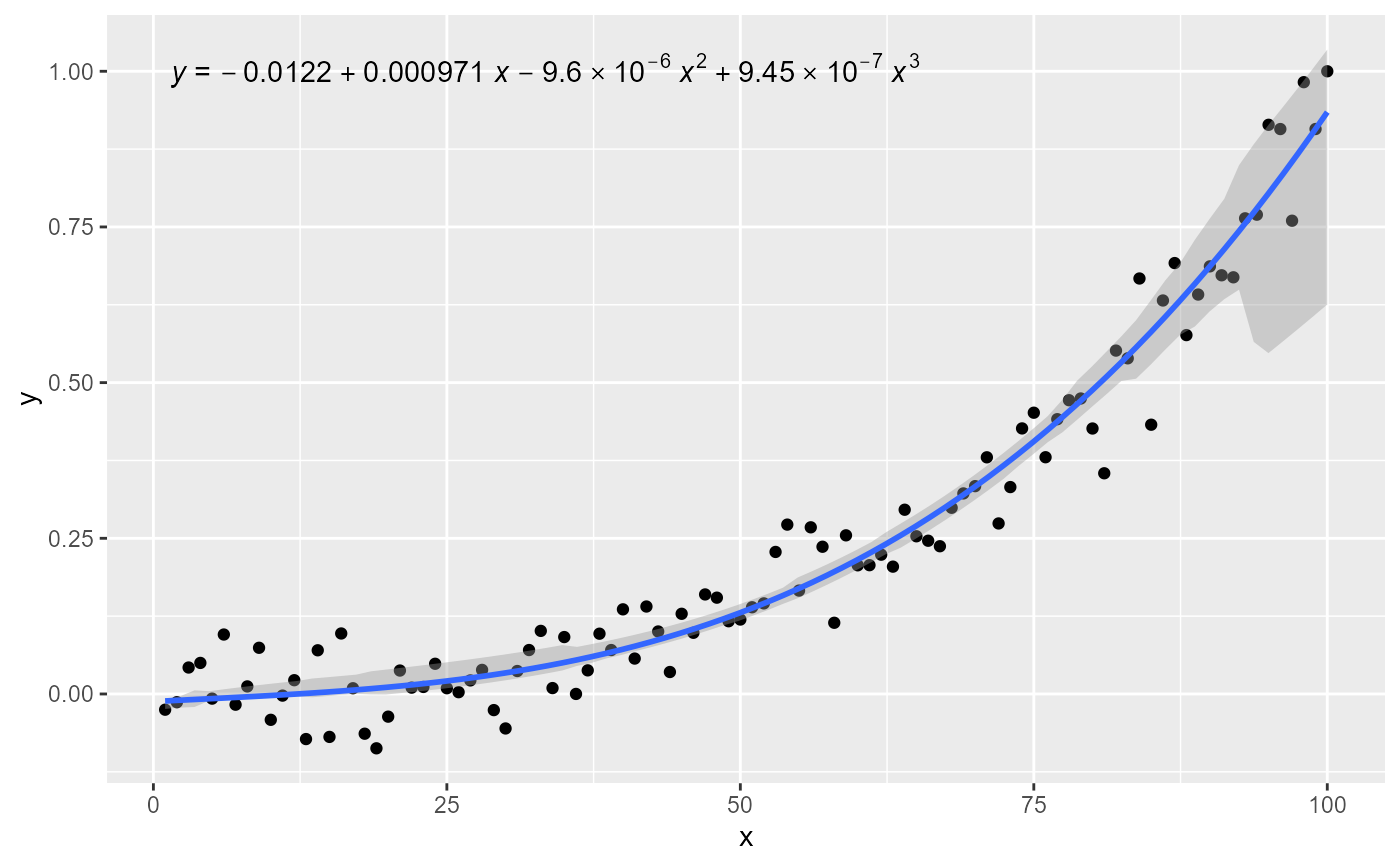
Quantile regression predictions and annotations
Source:R/stat-quant-band.r, R/stat-quant-eq.R, R/stat-quant-line.r
stat_quant_eq.RdStatistics stat_quant_line(), stat_quant_band() and
stat_quant_eq() fit models by quantile regression. While
stat_quant_line() and stat_quant_band() add prediction lines and
bands, stat_quant_eq() adds textual labels to a plot.
Usage
stat_quant_band(
  mapping = NULL,
  data = NULL,
  geom = "smooth",
  position = "identity",
  ...,
  orientation = NA,
  quantiles = c(0.25, 0.5, 0.75),
  formula = NULL,
  fit.seed = NA,
  fm.values = FALSE,
  n = 80,
  fullrange = FALSE,
  limit.to = NULL,
  method = "rq",
  method.args = list(),
  n.min = 3L,
  na.rm = FALSE,
  show.legend = NA,
  inherit.aes = TRUE
)

stat_quant_eq(
  mapping = NULL,
  data = NULL,
  geom = "text_npc",
  position = "identity",
  ...,
  orientation = NA,
  formula = NULL,
  quantiles = c(0.25, 0.5, 0.75),
  method = "rq:br",
  method.args = list(),
  n.min = 10L,
  fit.seed = NA,
  eq.with.lhs = TRUE,
  eq.x.rhs = NULL,
  coef.digits = 3,
  coef.keep.zeros = TRUE,
  decreasing = getOption("ggpmisc.decreasing.poly.eq", FALSE),
  rho.digits = 4,
  label.x = "left",
  label.y = "top",
  hstep = 0,
  vstep = NULL,
  output.type = NULL,
  na.rm = FALSE,
  parse = NULL,
  show.legend = FALSE,
  inherit.aes = TRUE
)

stat_quant_line(
  mapping = NULL,
  data = NULL,
  geom = "smooth",
  position = "identity",
  ...,
  orientation = NA,
  quantiles = c(0.25, 0.5, 0.75),
  formula = NULL,
  se = length(quantiles) == 1L,
  fit.seed = NA,
  fm.values = FALSE,
  n = 80,
  fullrange = FALSE,
  limit.to = NULL,
  method = "rq",
  method.args = list(),
  n.min = 3L,
  level = 0.95,
  type = "direct",
  interval = "confidence",
  na.rm = FALSE,
  show.legend = NA,
  inherit.aes = TRUE
)
Arguments
- mapping
The aesthetic mapping, usually constructed with
aes(). Only needs to be set at the layer level if you are overriding the plot defaults.- data
A layer specific dataset, only needed if you want to override the plot defaults.
- geom
The geometric object to use display the data
- position
The position adjustment to use for overlapping points on this layer.
- ...
other arguments passed on to
layer. This can include aesthetics whose values you want to set, not map. Seelayerfor more details.- orientation
character Either "x" or "y" controlling the default for
formula. The letter indicates the aesthetic considered the explanatory variable in the model fit.- quantiles
numeric vector Values in 0..1 indicating the quantiles.
- formula
a formula object. Using aesthetic names
xandyinstead of original variable names.- fit.seed
RNG seed argument passed to
set.seed(). Defaults toNA, indicating thatset.seed()should not be called.- fm.values
logical Add metadata and parameter estimates extracted from the fitted model object;
FALSEby default.- n
Number of points at which to predict with the fitted model.
- fullrange
logical Should the fit prediction span the full range of the plot, or just the range of the explanatory variable?
- limit.to
character or numeric If character one of
"","x","y"or"xy". Should the fit prediction be constrained to the range of the variables mapped toxand/oryin each data group? If numeric, the new data values to use for the explanatory variable when computing the predicted line and confidence band. When set,limit.tosilently overridesfullrange!- method
function or character If character, "rq", "rqss" or the name of a model fit function are accepted, possibly followed by the fit function's
methodargument separated by a colon (e.g."rq:br"). If a function different torq(), it must accept arguments namedformula,data,weights,tauandmethodand return a model fit object of classrq,rqsorrqss.- method.args
named list with additional arguments passed to
rq(),rqss()or to another function passed as argument tomethod.- n.min
integer Minimum number of distinct values in the explanatory variable (on the rhs of formula) for fitting to the attempted.
- na.rm
a logical indicating whether NA values should be stripped before the computation proceeds.
- show.legend
logical. Should this layer be included in the legends?
NA, the default, includes if any aesthetics are mapped.FALSEnever includes, andTRUEalways includes.- inherit.aes
If
FALSE, overrides the default aesthetics, rather than combining with them. This is most useful for helper functions that define both data and aesthetics and shouldn't inherit behaviour from the default plot specification, e.g.borders.- eq.with.lhs
If
characterthe string is pasted to the front of the equation label before parsing or alogical(see note).- eq.x.rhs
characterthis string will be used as replacement for"x"in the model equation when generating the label before parsing it.- coef.digits, rho.digits
integer Number of significant digits to use for the fitted coefficients and rho in labels.
- coef.keep.zeros
logical Keep or drop trailing zeros when formatting the fitted coefficients and F-value.
- decreasing
logical It specifies the order of the terms in the returned character string; in increasing (default) or decreasing powers.
- label.x, label.y
numericwith range 0..1 "normalized parent coordinates" (npc units) or character if usinggeom_text_npc()orgeom_label_npc(). If usinggeom_text()orgeom_label()numeric in native data units. If too short they will be recycled.- hstep, vstep
numeric in npc units, the horizontal and vertical step used between labels for different groups.
- output.type
character One of "expression", "text", "markdown", "marquee", "latex", "latex.eqn", "latex.deqn" or "numeric".
- parse
logical Passed to the geom. If
TRUE, the labels will be parsed into expressions and displayed as described inplotmath. Default isTRUEifoutput.type = "expression"andFALSEotherwise.- se
logical Passed to
quantreg::predict.rq().- level
numeric in range [0..1] Passed to
quantreg::predict.rq().- type
character Passed to
quantreg::predict.rq().- interval
character Passed to
quantreg::predict.rq().
Value
stat_quant_eq() returns a data frame, with one row per
quantile and columns as described below, while stat_quant_line()
and stat_quant_band() return a data frame, with n rows per
quantile and columns as described below. If the number of observations
is less than n.min or if the model fit method returns NA or
NULL, a data frame with no rows or columns is returned, resulting
in an empty/invisible plot layer.
Details
While stat_poly_line() and stat_poly_eq() fit
a single model per plot layer, stat_quant_line(), stat_quant_band()
and stat_quant_eq() can fit multiple models sharing the same
method and formula but differing in their
probability. These probabilities are passed a vector argument to parameter
quantiles.
stat_quant_line fits one or more quantile regressions and obtains
predictions similarly to stat_quantile() from
'ggplot2', but in addition it computes confidence regions for the
prediction lines. By default each quantile is plotted as a line, with a
confidence band when se = TRUE.
stat_quant_band() fits quantile regressions and obtains predictions
identically to stat_quant_line(). stat_quant_band() fits 2 or
3 quantiles in the same plot layer and displays the area between the
predicted regression lines for the extreme quantiles as a band.
stat_quant_eq() fits quantile regressions and generates a set of
labels for each regression line fitted. By default the labels are formatted
as R's plotmath expressions, LaTeX and
markdown are also supported.
stat_quant_eq(), stat_quant_line() and
stat_quant_band() support both "rq" and "rqss" as
method. In the case of "rqss" the model formula makes
normally use of qss() to formulate the spline and its constraints.
User defined functions are supported as method as long as they
accept arguments named formula, data, weights,
tau and method and return a model fit object of class
rq, rqs or rqss. Such user-defined functions can
implement model selection and/or method selection, or conditionally skip
model fitting on a per data group basis.
The minimum number of observations with distinct values in the explanatory
variable can be set through parameter n.min. The default n.min
= 10L is a bare minimum for quantile regression. Model fits with such a
small number of observations are of little interest and using larger values
of n.min than the default is wise.
There are interesting uses for double quantile regression, i.e., a
pair of quantile regressions on x and y on the same data. For
example, when two variables are subject to mutual constrains, it is useful
to consider both of them as explanatory and interpret the relationship
based on them considered as limiting. 'ggpmisc' (>= 0.4.1) supports
orientation making it easy implement the approach described by
Cardoso (2019) under the name of "Double quantile regression".
The default argument used for output.type is guessed from the name
of the geometry. The default argument for parse is set based on
output-type, but if labels that need parsing are formatted from
numeric output within a call to aes(), or if the name of a
geom is not recognized, it can be necessary to override this default.
Variables returned by stat_quant_eq()
If output.type is "numeric" the returned tibble contains columns
in addition to a modified version of the original group:
- x,npcx
x position
- y,npcy
y position
- coef.ls
list containing the "coefficients" matrix from the summary of the fit object
- rho, AIC, n
numeric values extracted or computed from fit object
- rq.method
character, method used.
- hjust, vjust
Set to "inward" to override the default of the "text" geom.
- quantile
Indicating the quantile used for the fit
- quantile.f
Factor with a level for each quantile
- b_0.constant
TRUE is polynomial is forced through the origin
- b_i
One or columns with the coefficient estimates
If output.type different from "numeric" the returned tibble contains
columns below in addition to a modified version of the original group:
- x,npcx
x position
- y,npcy
y position
- eq.label
equation for the fitted polynomial as a character string to be parsed
- r.label, and one of cor.label, rho.label, or tau.label
\(rho\) of the fitted model as a character string to be parsed
- AIC.label
AIC for the fitted model.
- n.label
Number of observations used in the fit.
- method.label
Set according
methodused.- rq.method
character, method used.
- rho, n
numeric values extracted or computed from fit object.
- hjust, vjust
Set to "inward" to override the default of the "text" geom.
- quantile
Numeric value of the quantile used for the fit
- quantile.f
Factor with a level for each quantile
Variables returned by stat_quant_line()
- y or x
predicted value
- ymin or xmin
lower confidence limit around the fitted line
- ymax or xmax
upper confidence limit around the fitted line
If fm.values = TRUE is passed then one column with the number of
observations n used for each fit is also included, with the same
value in each row within a group. This is wasteful and disabled by default,
but provides a simple and robust approach to achieve effects like colouring
or hiding of the model fit line based on the number of observations.
Variables returned by stat_quant_band()
- y or x
Regression prediction for the middle quantile, if three quantiles are passed as argument
- ymin or xmin
Regression prediction for the smallest quantile
- ymax or xmax
Regression prediction for the largest quantile
If fm.values = TRUE is passed then one column with the number of
observations n used for each fit is also included, with the same
value in each row within a group. This is wasteful and disabled by default,
but provides a simple and robust approach to achieve effects like colouring
or hiding of the model fit line based on the number of observations.
Output types
The formatting of character strings to be displayed in plots are marked as mathematical equations. Depending on the geom used, the mark-up needs to be encoded differently, or in some cases mark-up not applied.
"expression"The labels are encoded as character strings to be parsed into R's plotmath expressions.
"LaTeX", "TeX", "tikz", "latex"The labels are encoded as 'LaTeX' maths equations, without the "fences" for switching in math mode.
"latex.eqn"Same as
"latex"but enclosed in single$, i.e., as in-line maths."latex.deqn"Same as
"latex"but enclosed in double$$, i.e., as display maths."markdown"The labels are encoded as character strings using markdown syntax, with some embedded HTML.
"marquee"The labels are encoded as character strings using markdown syntax, with 'marquee' supported spans.
"text"The labels are plain ASCII character strings.
"numeric"No labels are generated. This value is accepted by the statistics, but not by the label formatting functions.
NULLThe value used depends on the argument passed to
geom.
If geom = "latex" (package 'xdvir') the output type used is
"latex.eqn". If geom = "richtext" (package 'ggtext') or
geom = "textbox" (package 'ggtext') the output type used is
"markdown". If geom = "marquee" (package 'marquee') the output
type used is "marquee". For all other values of geom the default
is "expression". Invalid values as argument trigger an error.
Model equation label
By default the equation label uses as symbols the names of the aesthetics,
x and y. However, "x" and "y" can be
substituted by providing a replacement character string for the
right-hand-side and left-hand-side through eq.x.rhs and
eq.with.lhs, respectively. For backward compatibility a logical is
also accepted as argument for eq.with.lhs, with FALSE
suppressing the left-hand-side.
If the model formula includes a transformation of the explanatory
variable in its right-hand-side (rhs), a matching argument should be passed
to parameter eq.x.rhs as its default value would result in an
equation label that does not reflect the applied transformation. In most
cases, a transformation should not be applied within the left hand side
(lhs) of the model formula, but instead in the mapping of the response
variable within aes. In this case it may be necessary to also pass a
matching argument to parameter eq.with.lhs.
Parameter orientation is redundant as the orientation can be set
by the formula but is included for consistency with
ggplot2::stat_smooth().
Position of labels
When data are grouped by mapping a factor to an aesthetic, e.g.,
colour, shape and/or linetype the model is fitted
separately to each group, and for each group a whole set of labels is
generated. If the argument passed to label.y is a vector of length
1, this value determines the position of the equation and/or other labels
for the first group, and the positions of the labels for the remaining
groups are generated by adding vspace based on the group number.
If the argument passed to label.y is a vector of length > 1, it is
used unchanged, possibly extended by recycling, ignoring vstep.
If the labels are rotated by 90 degrees then the automatic stepping is
best based on hstep with vstep = 0. Similarly as described
above, if label.x is a vector of length > 1, it is
used unchanged, possibly extended by recycling, ignoring hstep.
When using facets and with a grouping that does not repeat in each panel,
the automatic positioning in most cases will not be the desired one. Manual
positioning using a vector of length > 1 for label.x and/or
label.y is the currently available workaround.
Model formula and model fitting
A ggplot statistic receives as data a data frame that is not the one
passed as argument by the user, but instead a data frame with the variables
mapped to aesthetics. In stat_poly_eq() the compute function is
applied by group, each call "seeing" the subset of data for an
individual group. As supported models are for regression lines,
variables mapped to x and y should both be continuous, i.e.,
numeric or date time and model formulas defined using x and y
as variable names.
The interpretation of the argument passed to formula is enhanced
compared to stat_smooth(). Formulas with x as explanatory
variable work as in stat_smooth() but formulas with y as
explanatory variable are also accepted. orientation is set
automatically based on which explanatory variable appears in the formula.
Spline-based smoothers are only partially supported.
Range of the prediction line
The range of the prediction line is
controlled by parameters fullrange and limit.to.
fullrange is backwards compatible both with earlier versions of
'ggpmisc' and with stat_smooth() from 'ggplot2'; an argument passed
to limit.to overrides fullrange making it possible to
constrain the range to that of x, y, or both simultaneously,
with "x", "y", or "xy", respectively, as argument.
limit.to also accepts a numeric vector of values to be used as
newdata when computing the prediction. Limiting the range based on
both aesthetics is the best approach for major axis regression (MA, SMA,
RMA) but can occasionally be useful also with some other methods when
slopes are very steep and error variance in the explanatory variable is
large. A numeric vector can be used to predict the response at specific
values of the explanatory variable. If a single or very few values are
predicted, it can be necessary to override the default geom =
"smooth" with geom = "pointrange".
Model fit methods supported
Several model fit functions are supported explicitly (see tables), and some
of their differences smoothed out. Compatibility is checked late, based on
the class of the returned fitted model object. This makes it possible to
use wrapper functions that do model selection or other adjustments to the
fit procedure on a per panel or per group basis. Moreover, if the value
returned as model fit object is NULL or NA, plotting is
skipped on a per group within panel basis.
In the case of fitted model objects of classes not explicitly supported, an attempt is made to find the usual accessors and/or fitted object members, and if found, either complete or partial support is frequently achieved. In this case a message is issued encouraging users to check the validity of the values extracted as the structure of fitted model objects belonging to different classes and the values returned by their accessors can vary, potentially resulting in decoding errors leading to the return of wrong values for estimates.
The argument to parameter method can be either the name of a
function object, possibly using double colon notation in case its package
is not attached, or a character string matching the function name for
functions in the search path. This approach makes it possible to support
model fit functions that are not dependencies of 'ggpmisc'. Either by
attaching the package where the function is defined and passing it by name
or as string, or using double colon notation when passing the name of the
function.
User-defined functions can be passed as argument to parameter method
as long as they have parameters formula, data subset
and possibly weights. Additional arguments can be passed to any
method as a named list through parameter method.args. As in
stat_smooth() prior weights are
passed to the model fit functions' weights (plural!) parameter by
mapping a numeric variable to plot aesthetic weight (singular!).
Tables 1 lists natively supported model fit functions, with the caveat that only some 'broom' methods' specializations have been actually tested with statistics from 'ggpmisc'. In addition, the statistics based on 'broom' methods require the user to tailor their behaviour by passing additional arguments in the call and occasionally some detective work to find out the names of variables in the returned data frame as these names are set by methods from 'broom'.
Table 1. Model fit methods supported by the different statistics available in package 'ggpmisc'. Column \(f\) indicates whether computations are done by group (G) or by plot panel (P).
| Statistic | \(f\) | Supported model fit methods |
stat_poly_line() | G | "lm", "rlm", "lts", "sma", "ma", "gls", "nls", "onls", others with methods predict() or fitted() |
stat_poly_eq() | G | "lm", "rlm", "lts", "sma", "ma", "gls", "nls", "onls", others with needed accesors |
stat_quant_line() | G | "rq", "rqss" |
stat_quant_band() | G | "rq", "rqss" |
stat_quant_eq() | G | "rq", "rqss" |
stat_ma_line() | G | "SMA", "MA", "RMA", "OLS" |
stat_ma_eq() | G | "SMA", "MA", "RMA", "OLS" |
stat_fit_residuals() | G | "lm", "rlm", "lts", "sma", "ma", "gls", "rq", "rqss", "nls", "onls", others with method residuals() |
stat_fit_fitted() | G | "lm", "rlm", "lts", "gls", "rq", "rqss", "nls", "onls", others with method fitted() |
stat_fit_deviations() | G | "lm", "rlm", "lts", "gls", "rq", "rqss", "nls", "onls", others with methods fitted() and weights() |
stat_fit_augment() | G | any with 'broom' method augment() |
stat_fit_glance() | G | any with 'broom' method glance() |
stat_fit_tidy() | G | any with 'broom' method tidy() |
stat_fit_tb() | P | any with 'broom' method tidy() |
The single colon notation is based on parsing
the name and is available when passing the name of the fit method as a
character string. In a string such as "head:tail" the "head" gives the name
of the model fit function and the "tail" gives the argument to pass it's
method parameter. This is only a convenience, as method.args
can be also used. In some methods, i.e., splines, the default
formula = y ~ x needs to be overridden by the user.
Table 2 lists the correspondence of pre-defined method names to model fit method functions. As mentioned above, these are only a subset of the model fit methods that are expected to work. When using these names there is no need for users to attach additional packages but the packages must be available (installed).
Table 2. Available predefined method names, the model fit functions
they call, the packages where the functions reside, the class of the
returned fitted model object and the arguments that can be
passed to their method parameter using single colon notation.
| Predefined method names | Model fit methods | R package | Object class |
| "lm", "lm:qr" | lm() | 'stats' | "lm" |
| "rlm", "rlm:M", "rlm:MM" | rlm() | 'MASS' | "rlm" ("lm") |
| "lts", "ltsReg" | ltsReg() | 'robustbase' | "lts" |
| "ma", "sma", "sma:SMA", "sma:MA", "sma:OLS" | sma() | 'smatr' | "ma" or "sma" |
| "gls", "gls:REML", "gls:ML" | gls() | 'nlme' | "gls" |
| "rq", "rq:sfn", "rq:sfnc", "rq:lasso" | rq() | 'quantreg' | "rq" |
| "rqss", "rqss:sfn", "rqss:sfnc", "rqss:lasso" | rqss() | 'quantreg' | "rqss" |
| "SMA", "MA", "RMA", "OLS" | lmodel2() | 'lmodel2' | ("list") |
Which variables are available for mapping?
Computed variables and
their names can vary depending on the method used to fit a model or
the output.type in use. They can also depend for a given
method on other arguments passed when fitting a model or extracting
estimates and other computed values. In many cases, when values are not
available, the variables are filled with NA values.
In the statistics returning formatted strings for use as annotations, a
message is issued by default in interactive R sessions, listing the short
names for available formatted labels as recognized by functions
use_label() and f_use_label(), except when
output.type = "numeric" is passed, in which case the names of all
variables accessible by after_stat() within a call to aes()
are listed. This default ("nicknames") can be changed by setting R
option "ggpmisc.stat.vars.message" to one of "names",
"colnames" or "none".
In the statistics that plot a prediction or more generally mainly return
numeric variables, a message is issued by default in interactive R
sessions, listing the names of all variables accessible by
after_stat() within a call to aes() with at least some
non-missing values. This default ("colnames") can be changed by
setting R option "ggpmisc.stat.vars.message" to "none".
To explore the whole returned data frame for a given input we suggest the
use of geom_debug().
References
Cardoso, G. C. (2019) Double quantile regression accurately assesses distance to boundary trade-off. Methods in ecology and evolution, 10(8), 1322-1331.
See also
Please, see the articles at online-only documentation for additional use examples and guidance.
statistics from 'ggpmisc' for model fit annotations:
stat_poly_eq(), stat_quant_eq(),
stat_ma_eq() and stat_distrmix_eq(), and for
model fit predictions: stat_poly_line(),
stat_quant_line(), stat_quant_band(),
stat_ma_line() and stat_distrmix_line().
Aesthetics
stat_quant_eq() understands the following aesthetics. Required aesthetics are displayed in bold and defaults are displayed for optional aesthetics:
| • | x | |
| • | y | |
| • | group | → inferred |
| • | grp.label | |
| • | hjust | → "inward" |
| • | label | → after_stat(eq.label) |
| • | npcx | → after_stat(npcx) |
| • | npcy | → after_stat(npcy) |
| • | vjust | → "inward" |
stat_quant_line() understands the following aesthetics. Required aesthetics are displayed in bold and defaults are displayed for optional aesthetics:
| • | x | |
| • | y | |
| • | group | → after_stat(group) |
| • | weight | → 1 |
stat_quant_band() understands the following aesthetics. Required aesthetics are displayed in bold and defaults are displayed for optional aesthetics:
| • | x | |
| • | y | |
| • | group | → inferred |
Learn more about setting these aesthetics in vignette("ggplot2-specs").
Examples
# generate artificial data
set.seed(4321)
x <- 1:100
y <- (x + x^2 + x^3) + rnorm(length(x), mean = 0, sd = mean(x^3) / 4)
y <- y / max(y)
my.data <- data.frame(x = x, y = y,
group = c("A", "B"),
y2 = y * c(1, 2) + max(y) * c(0, 0.1),
w = sqrt(x))
# Predictions as lines
ggplot(my.data, aes(x, y)) +
geom_point() +
stat_quant_line()
 ggplot(my.data, aes(x, y)) +
geom_point() +
stat_quant_line(quantiles = 0.5, se = TRUE)
ggplot(my.data, aes(x, y)) +
geom_point() +
stat_quant_line(quantiles = 0.5, se = TRUE)
 # Predictions as band
ggplot(my.data, aes(x, y)) +
geom_point() +
stat_quant_band()
# Predictions as band
ggplot(my.data, aes(x, y)) +
geom_point() +
stat_quant_band()
 # y as explanatory variable (orientation = y)
ggplot(my.data, aes(x, y)) +
geom_point() +
stat_quant_band(formula = x ~ y)
# y as explanatory variable (orientation = y)
ggplot(my.data, aes(x, y)) +
geom_point() +
stat_quant_band(formula = x ~ y)
 # Using splines
library(quantreg)
#> Loading required package: SparseM
ggplot(my.data, aes(x, y)) +
geom_point() +
stat_quant_line(method = "rqss",
formula = y ~ qss(x, constraint = "D"),
quantiles = 0.5, se = FALSE)
# Using splines
library(quantreg)
#> Loading required package: SparseM
ggplot(my.data, aes(x, y)) +
geom_point() +
stat_quant_line(method = "rqss",
formula = y ~ qss(x, constraint = "D"),
quantiles = 0.5, se = FALSE)
 # Adding annotations
ggplot(my.data, aes(x, y)) +
geom_point() +
stat_quant_line() +
stat_quant_eq()
#> Warning: Solution may be nonunique
#> Warning: Solution may be nonunique
#> Warning: Solution may be nonunique
# Adding annotations
ggplot(my.data, aes(x, y)) +
geom_point() +
stat_quant_line() +
stat_quant_eq()
#> Warning: Solution may be nonunique
#> Warning: Solution may be nonunique
#> Warning: Solution may be nonunique
 ggplot(my.data, aes(x, y)) +
geom_point() +
stat_quant_line() +
stat_quant_eq(mapping = use_label("eq"))
#> Warning: Solution may be nonunique
#> Warning: Solution may be nonunique
#> Warning: Solution may be nonunique
ggplot(my.data, aes(x, y)) +
geom_point() +
stat_quant_line() +
stat_quant_eq(mapping = use_label("eq"))
#> Warning: Solution may be nonunique
#> Warning: Solution may be nonunique
#> Warning: Solution may be nonunique
 ggplot(my.data, aes(x, y)) +
geom_point() +
stat_quant_line() +
stat_quant_eq(mapping = use_label("eq"), decreasing = TRUE)
#> Warning: Solution may be nonunique
#> Warning: Solution may be nonunique
#> Warning: Solution may be nonunique
ggplot(my.data, aes(x, y)) +
geom_point() +
stat_quant_line() +
stat_quant_eq(mapping = use_label("eq"), decreasing = TRUE)
#> Warning: Solution may be nonunique
#> Warning: Solution may be nonunique
#> Warning: Solution may be nonunique
 ggplot(my.data, aes(x, y)) +
geom_point() +
stat_quant_line() +
stat_quant_eq(mapping = use_label("eq", "method"))
#> Warning: Solution may be nonunique
#> Warning: Solution may be nonunique
#> Warning: Solution may be nonunique
ggplot(my.data, aes(x, y)) +
geom_point() +
stat_quant_line() +
stat_quant_eq(mapping = use_label("eq", "method"))
#> Warning: Solution may be nonunique
#> Warning: Solution may be nonunique
#> Warning: Solution may be nonunique
 # same formula as default
ggplot(my.data, aes(x, y)) +
geom_point() +
stat_quant_line(formula = y ~ x) +
stat_quant_eq(formula = y ~ x)
#> Warning: Solution may be nonunique
#> Warning: Solution may be nonunique
#> Warning: Solution may be nonunique
# same formula as default
ggplot(my.data, aes(x, y)) +
geom_point() +
stat_quant_line(formula = y ~ x) +
stat_quant_eq(formula = y ~ x)
#> Warning: Solution may be nonunique
#> Warning: Solution may be nonunique
#> Warning: Solution may be nonunique
 # explicit formula "x explained by y"
ggplot(my.data, aes(x, y)) +
geom_point() +
stat_quant_line(formula = x ~ y) +
stat_quant_eq(formula = x ~ y)
#> Warning: Solution may be nonunique
#> Warning: Solution may be nonunique
#> Warning: Solution may be nonunique
# explicit formula "x explained by y"
ggplot(my.data, aes(x, y)) +
geom_point() +
stat_quant_line(formula = x ~ y) +
stat_quant_eq(formula = x ~ y)
#> Warning: Solution may be nonunique
#> Warning: Solution may be nonunique
#> Warning: Solution may be nonunique
 # using color
ggplot(my.data, aes(x, y)) +
geom_point() +
stat_quant_line(mapping = aes(color = after_stat(quantile.f))) +
stat_quant_eq(mapping = aes(color = after_stat(quantile.f))) +
labs(color = "Quantiles")
#> Warning: Solution may be nonunique
#> Warning: Solution may be nonunique
#> Warning: Solution may be nonunique
# using color
ggplot(my.data, aes(x, y)) +
geom_point() +
stat_quant_line(mapping = aes(color = after_stat(quantile.f))) +
stat_quant_eq(mapping = aes(color = after_stat(quantile.f))) +
labs(color = "Quantiles")
#> Warning: Solution may be nonunique
#> Warning: Solution may be nonunique
#> Warning: Solution may be nonunique
 # location and colour
ggplot(my.data, aes(x, y)) +
geom_point() +
stat_quant_line(mapping = aes(color = after_stat(quantile.f))) +
stat_quant_eq(mapping = aes(color = after_stat(quantile.f)),
label.y = "bottom", label.x = "right") +
labs(color = "Quantiles")
#> Warning: Solution may be nonunique
#> Warning: Solution may be nonunique
#> Warning: Solution may be nonunique
# location and colour
ggplot(my.data, aes(x, y)) +
geom_point() +
stat_quant_line(mapping = aes(color = after_stat(quantile.f))) +
stat_quant_eq(mapping = aes(color = after_stat(quantile.f)),
label.y = "bottom", label.x = "right") +
labs(color = "Quantiles")
#> Warning: Solution may be nonunique
#> Warning: Solution may be nonunique
#> Warning: Solution may be nonunique
 # give a name to a formula
formula <- y ~ poly(x, 3, raw = TRUE)
ggplot(my.data, aes(x, y)) +
geom_point() +
stat_quant_line(formula = formula, linewidth = 0.5) +
stat_quant_eq(formula = formula)
# give a name to a formula
formula <- y ~ poly(x, 3, raw = TRUE)
ggplot(my.data, aes(x, y)) +
geom_point() +
stat_quant_line(formula = formula, linewidth = 0.5) +
stat_quant_eq(formula = formula)
 # angle
ggplot(my.data, aes(x, y)) +
geom_point() +
stat_quant_line(formula = formula, linewidth = 0.5) +
stat_quant_eq(formula = formula, angle = 90, hstep = 0.04, vstep = 0,
label.y = 0.02, hjust = 0, size = 3) +
expand_limits(x = -15) # make space for equations
# angle
ggplot(my.data, aes(x, y)) +
geom_point() +
stat_quant_line(formula = formula, linewidth = 0.5) +
stat_quant_eq(formula = formula, angle = 90, hstep = 0.04, vstep = 0,
label.y = 0.02, hjust = 0, size = 3) +
expand_limits(x = -15) # make space for equations
 # user set quantiles
ggplot(my.data, aes(x, y)) +
geom_point() +
stat_quant_line(formula = formula, quantiles = 0.5) +
stat_quant_eq(formula = formula, quantiles = 0.5)
# user set quantiles
ggplot(my.data, aes(x, y)) +
geom_point() +
stat_quant_line(formula = formula, quantiles = 0.5) +
stat_quant_eq(formula = formula, quantiles = 0.5)
 ggplot(my.data, aes(x, y)) +
geom_point() +
stat_quant_band(formula = formula,
quantiles = c(0.1, 0.5, 0.9)) +
stat_quant_eq(formula = formula, parse = TRUE,
quantiles = c(0.1, 0.5, 0.9))
ggplot(my.data, aes(x, y)) +
geom_point() +
stat_quant_band(formula = formula,
quantiles = c(0.1, 0.5, 0.9)) +
stat_quant_eq(formula = formula, parse = TRUE,
quantiles = c(0.1, 0.5, 0.9))
 # grouping
ggplot(my.data, aes(x, y2, color = group)) +
geom_point() +
stat_quant_line(formula = formula, linewidth = 0.5) +
stat_quant_eq(formula = formula)
# grouping
ggplot(my.data, aes(x, y2, color = group)) +
geom_point() +
stat_quant_line(formula = formula, linewidth = 0.5) +
stat_quant_eq(formula = formula)
 ggplot(my.data, aes(x, y2, color = group)) +
geom_point() +
stat_quant_band(formula = formula, linewidth = 0.75) +
stat_quant_eq(formula = formula) +
theme_bw()
ggplot(my.data, aes(x, y2, color = group)) +
geom_point() +
stat_quant_band(formula = formula, linewidth = 0.75) +
stat_quant_eq(formula = formula) +
theme_bw()
 # labelling equations
ggplot(my.data, aes(x, y2, shape = group, linetype = group,
grp.label = group)) +
geom_point() +
stat_quant_band(formula = formula, color = "black", linewidth = 0.75) +
stat_quant_eq(mapping = use_label("grp", "eq", sep = "*\": \"*"),
formula = formula) +
expand_limits(y = 3) +
theme_classic()
# labelling equations
ggplot(my.data, aes(x, y2, shape = group, linetype = group,
grp.label = group)) +
geom_point() +
stat_quant_band(formula = formula, color = "black", linewidth = 0.75) +
stat_quant_eq(mapping = use_label("grp", "eq", sep = "*\": \"*"),
formula = formula) +
expand_limits(y = 3) +
theme_classic()
 # modifying the explanatory variable within the model formula
# modifying the response variable within aes()
formula.trans <- y ~ I(x^2)
ggplot(my.data, aes(x, y + 1)) +
geom_point() +
stat_quant_line(formula = formula.trans) +
stat_quant_eq(mapping = use_label("eq"),
formula = formula.trans,
eq.x.rhs = "~x^2",
eq.with.lhs = "y + 1~~`=`~~")
#> Warning: Solution may be nonunique
#> Warning: Solution may be nonunique
#> Warning: Solution may be nonunique
# modifying the explanatory variable within the model formula
# modifying the response variable within aes()
formula.trans <- y ~ I(x^2)
ggplot(my.data, aes(x, y + 1)) +
geom_point() +
stat_quant_line(formula = formula.trans) +
stat_quant_eq(mapping = use_label("eq"),
formula = formula.trans,
eq.x.rhs = "~x^2",
eq.with.lhs = "y + 1~~`=`~~")
#> Warning: Solution may be nonunique
#> Warning: Solution may be nonunique
#> Warning: Solution may be nonunique
 # using weights
ggplot(my.data, aes(x, y, weight = w)) +
geom_point() +
stat_quant_line(formula = formula, linewidth = 0.5) +
stat_quant_eq(formula = formula)
# using weights
ggplot(my.data, aes(x, y, weight = w)) +
geom_point() +
stat_quant_line(formula = formula, linewidth = 0.5) +
stat_quant_eq(formula = formula)
 # no weights, quantile set to upper boundary
ggplot(my.data, aes(x, y)) +
geom_point() +
stat_quant_line(formula = formula, quantiles = 0.95) +
stat_quant_eq(formula = formula, quantiles = 0.95)
#> Warning: 2 non-positive fis
# no weights, quantile set to upper boundary
ggplot(my.data, aes(x, y)) +
geom_point() +
stat_quant_line(formula = formula, quantiles = 0.95) +
stat_quant_eq(formula = formula, quantiles = 0.95)
#> Warning: 2 non-positive fis
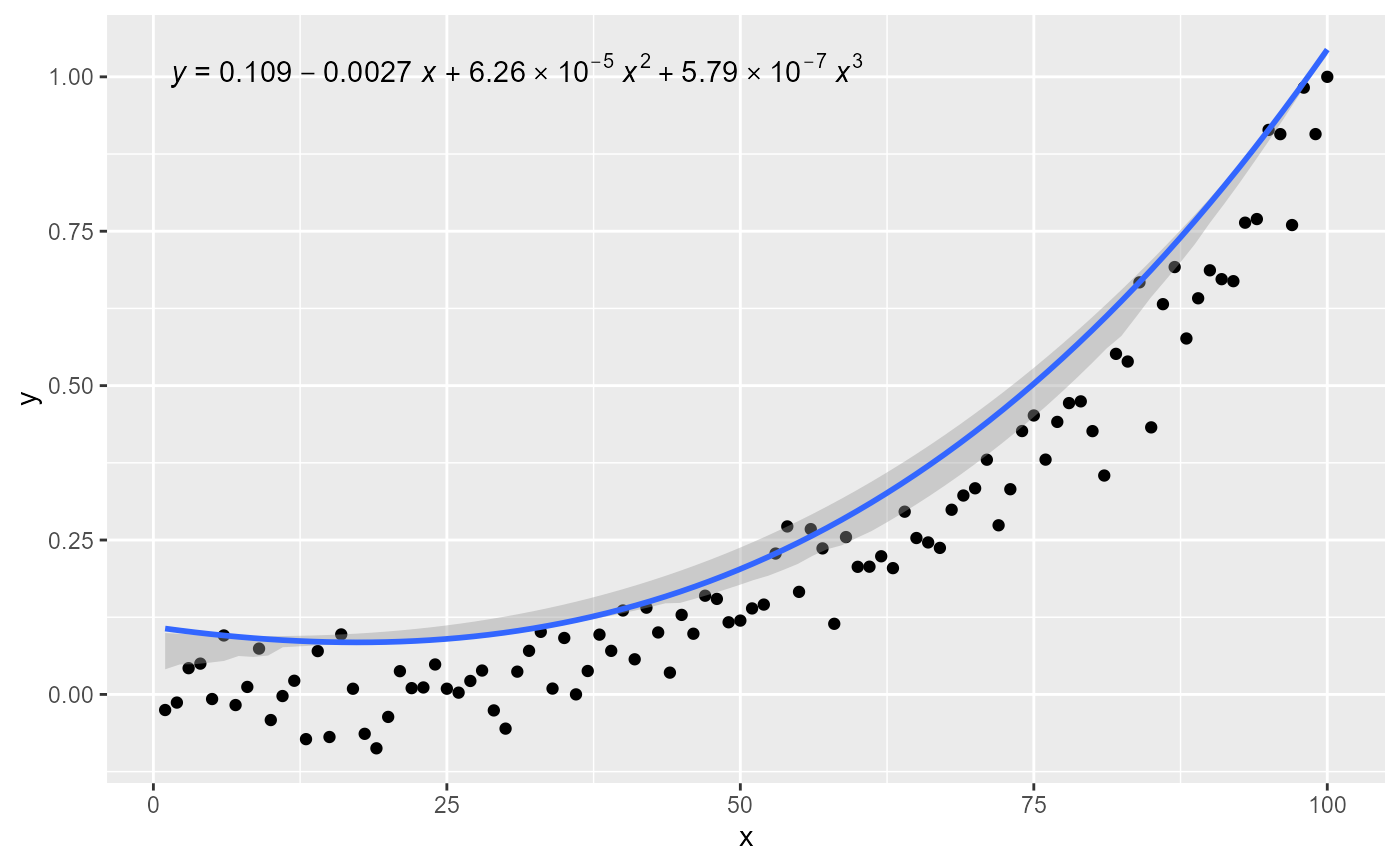 # manually assemble and map a specific label using paste() and aes()
ggplot(my.data, aes(x, y2, color = group, grp.label = group)) +
geom_point() +
stat_quant_line(method = "rq", formula = formula,
quantiles = c(0.05, 0.5, 0.95),
linewidth = 0.5) +
stat_quant_eq(mapping = aes(label =
after_stat(
paste(grp.label, "*\": \"*", eq.label, sep = ""))),
quantiles = c(0.05, 0.5, 0.95),
formula = formula, size = 3)
# manually assemble and map a specific label using paste() and aes()
ggplot(my.data, aes(x, y2, color = group, grp.label = group)) +
geom_point() +
stat_quant_line(method = "rq", formula = formula,
quantiles = c(0.05, 0.5, 0.95),
linewidth = 0.5) +
stat_quant_eq(mapping = aes(label =
after_stat(
paste(grp.label, "*\": \"*", eq.label, sep = ""))),
quantiles = c(0.05, 0.5, 0.95),
formula = formula, size = 3)
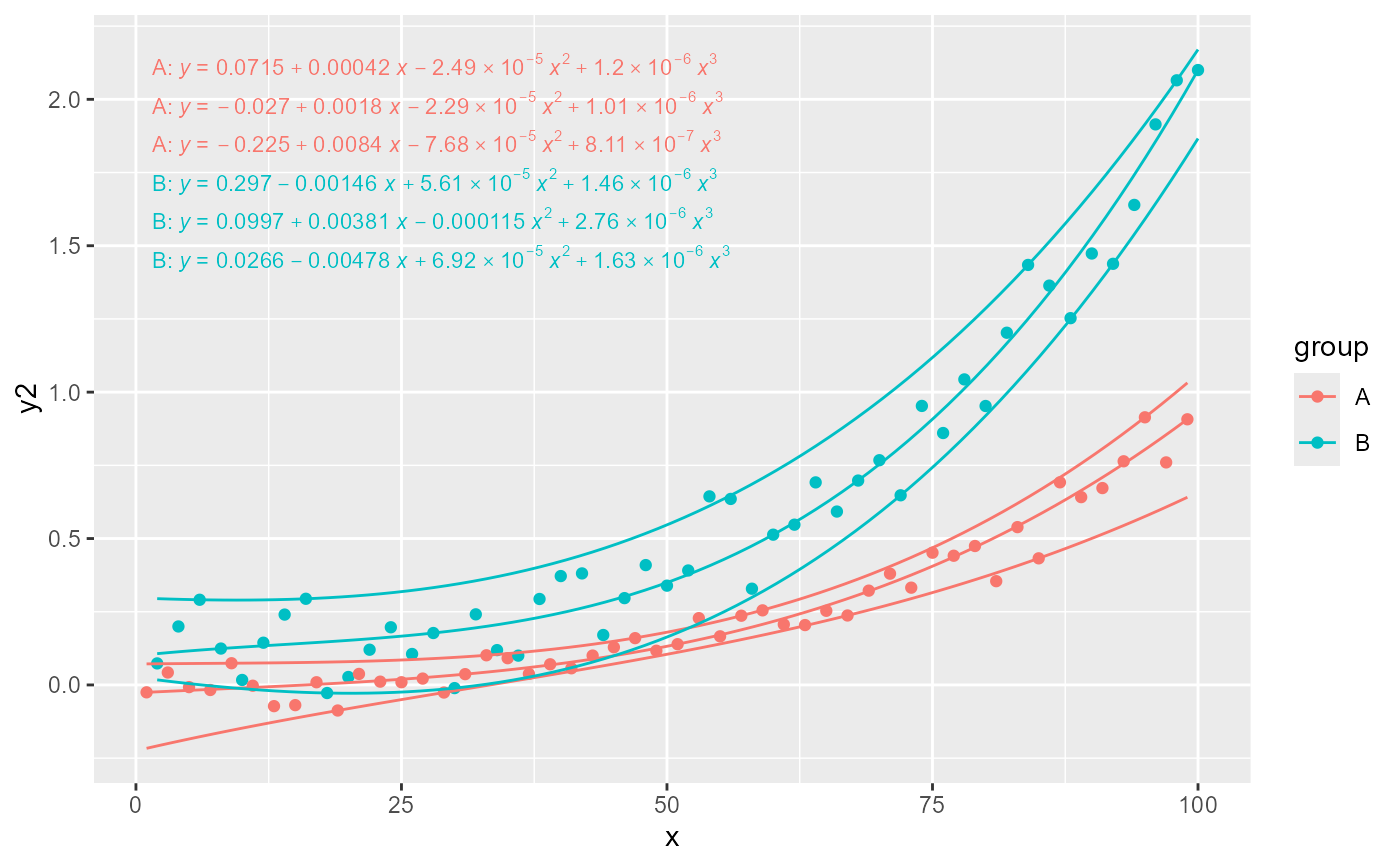 # manually assemble and map a specific label using sprintf() and aes()
ggplot(my.data, aes(x, y2, color = group, grp.label = group)) +
geom_point() +
stat_quant_band(method = "rq", formula = formula,
quantiles = c(0.05, 0.5, 0.95)) +
stat_quant_eq(mapping = aes(label =
after_stat(
sprintf("%s*\": \"*%s", grp.label, eq.label))),
quantiles = c(0.05, 0.5, 0.95),
formula = formula, size = 3)
# manually assemble and map a specific label using sprintf() and aes()
ggplot(my.data, aes(x, y2, color = group, grp.label = group)) +
geom_point() +
stat_quant_band(method = "rq", formula = formula,
quantiles = c(0.05, 0.5, 0.95)) +
stat_quant_eq(mapping = aes(label =
after_stat(
sprintf("%s*\": \"*%s", grp.label, eq.label))),
quantiles = c(0.05, 0.5, 0.95),
formula = formula, size = 3)
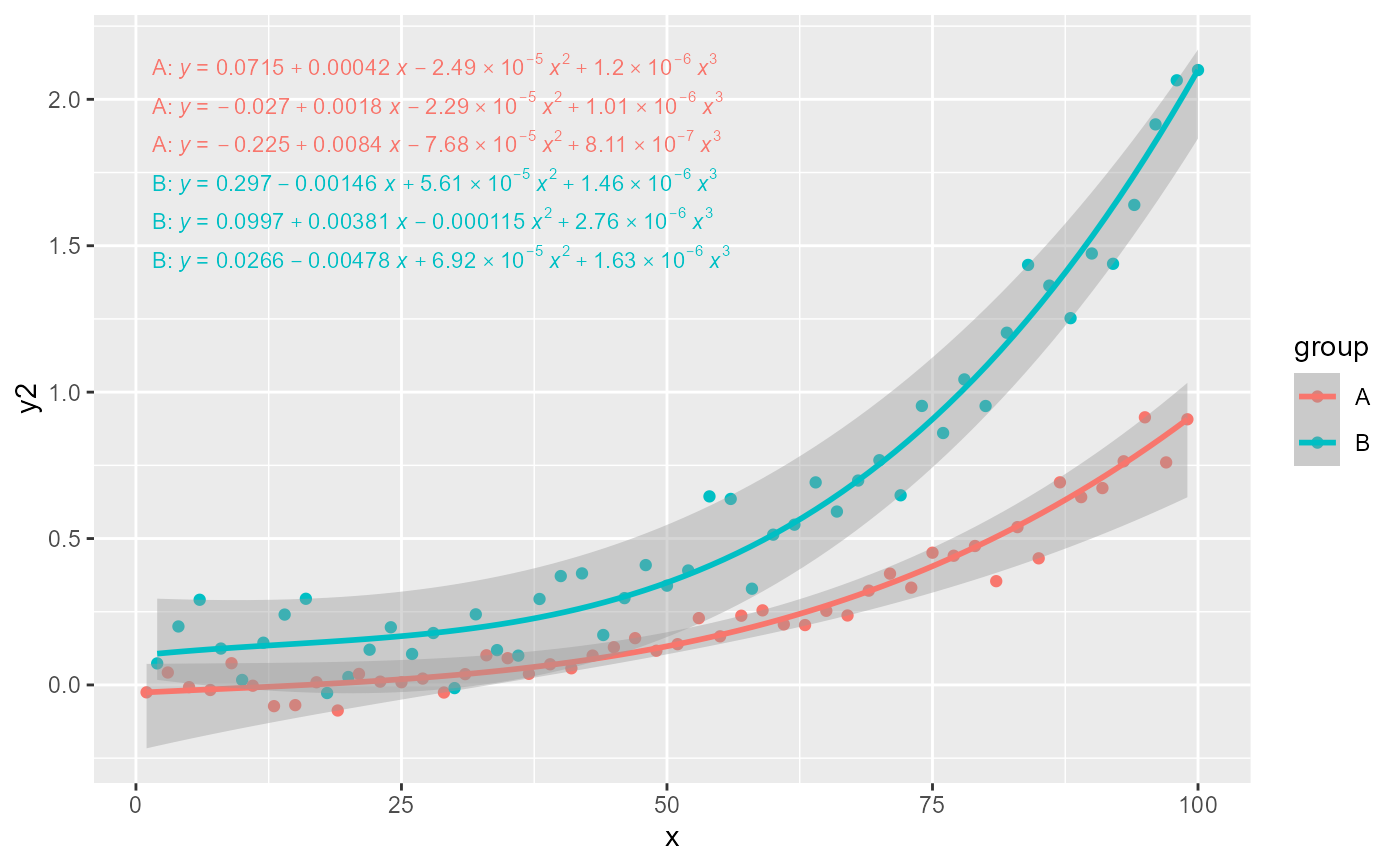 # geom = "text"
ggplot(my.data, aes(x, y)) +
geom_point() +
stat_quant_line(formula = formula, quantiles = 0.5) +
stat_quant_eq(label.x = "left", label.y = "top",
formula = formula,
quantiles = 0.5)
# geom = "text"
ggplot(my.data, aes(x, y)) +
geom_point() +
stat_quant_line(formula = formula, quantiles = 0.5) +
stat_quant_eq(label.x = "left", label.y = "top",
formula = formula,
quantiles = 0.5)